Install openlawsvpn
Linux CLI, GTK4 GUI, macOS CLI, and Android app — open source, zero runtime dependencies.
Platforms
Linux CLI
Statically linked Go binary. No Mono, no Java, no Electron, no runtime. Works on any Linux distro. amd64, arm64, ppc64le.
GTK4 Desktop GUI
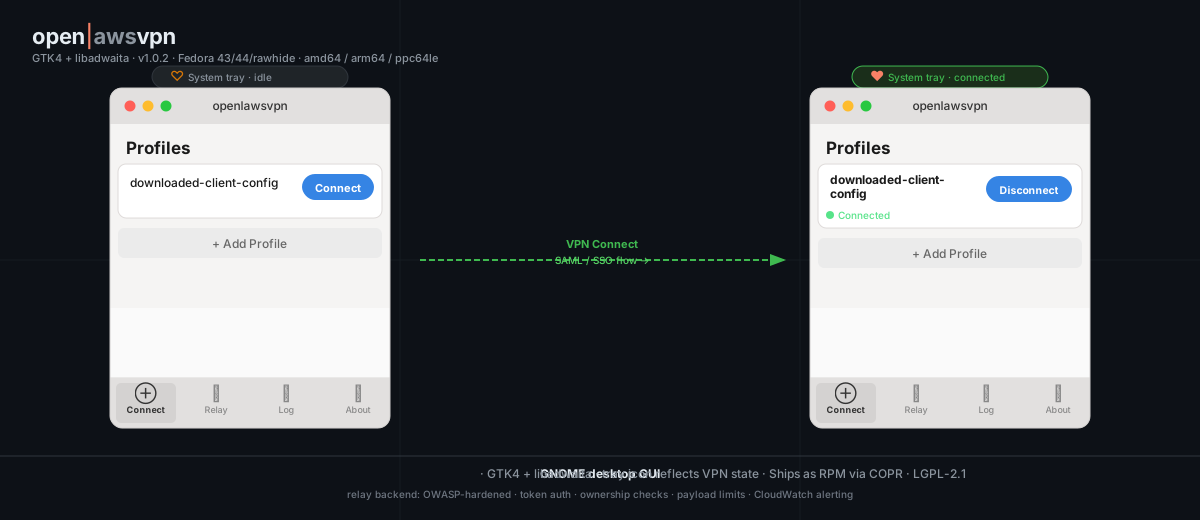
libadwaita app for GNOME — profile importer, one-click connect, tray icon. Ships as a Fedora COPR RPM.
macOS CLI
Statically linked binary for Apple Silicon (arm64) and Intel (amd64). Download from GitHub Releases.
Android App
Pure Go VPN core via gomobile — no NDK, no JNI glue. SAML authentication in-app via Chrome Custom Tab.
Play StoreInstall
BASE=https://github.com/openlawsvpn/go-openlawsvpn/releases/latest/download
curl -LO $BASE/openlawsvpn-cli-linux-amd64
chmod +x openlawsvpn-cli-linux-amd64
sudo mv openlawsvpn-cli-linux-amd64 /usr/local/bin/openlawsvpn-cli
BASE=https://github.com/openlawsvpn/go-openlawsvpn/releases/latest/download
curl -LO $BASE/openlawsvpn-cli-linux-arm64
chmod +x openlawsvpn-cli-linux-arm64
sudo mv openlawsvpn-cli-linux-arm64 /usr/local/bin/openlawsvpn-cliBASE=https://github.com/openlawsvpn/go-openlawsvpn/releases/latest/download
curl -LO $BASE/openlawsvpn-cli-linux-ppc64le
chmod +x openlawsvpn-cli-linux-ppc64le
sudo mv openlawsvpn-cli-linux-ppc64le /usr/local/bin/openlawsvpn-clistatically linked, zero dependencies — requires root or CAP_NET_ADMIN+CAP_NET_RAW
for the GUI or Fedora RPM — use the Fedora / RHEL tab
BASE=https://github.com/openlawsvpn/go-openlawsvpn/releases/latest/download
curl -LO $BASE/openlawsvpn-cli-macos-arm64
chmod +x openlawsvpn-cli-macos-arm64
xattr -d com.apple.quarantine openlawsvpn-cli-macos-arm64
sudo mv openlawsvpn-cli-macos-arm64 /usr/local/bin/openlawsvpn-cli
BASE=https://github.com/openlawsvpn/go-openlawsvpn/releases/latest/download
curl -LO $BASE/openlawsvpn-cli-macos-amd64
chmod +x openlawsvpn-cli-macos-amd64
xattr -d com.apple.quarantine openlawsvpn-cli-macos-amd64
sudo mv openlawsvpn-cli-macos-amd64 /usr/local/bin/openlawsvpn-clistatically linked — run with sudo or grant network extension permissions when prompted
the xattr line removes the Gatekeeper quarantine flag added to files downloaded from the internet
sudo dnf copr enable vorona/openlawsvpn -y
sudo dnf install openlawsvpn-cli -y
sudo openlawsvpn-cli --config ~/Downloads/downloaded-client-config.ovpn
requires root or CAP_NET_ADMIN+CAP_NET_RAW
sudo dnf copr enable vorona/openlawsvpn -y
sudo dnf install openlawsvpn-cli -y
sudo openlawsvpn-cli --config ~/Downloads/downloaded-client-config.ovpn
relay mode: openlawsvpn-cli -relay <token> -daemon
sudo dnf copr enable vorona/openlawsvpn -y
sudo dnf install openlawsvpn-gui -y
openlawsvpn-gui
GTK4 + libadwaita desktop app — pulls in openlawsvpn-daemon automatically
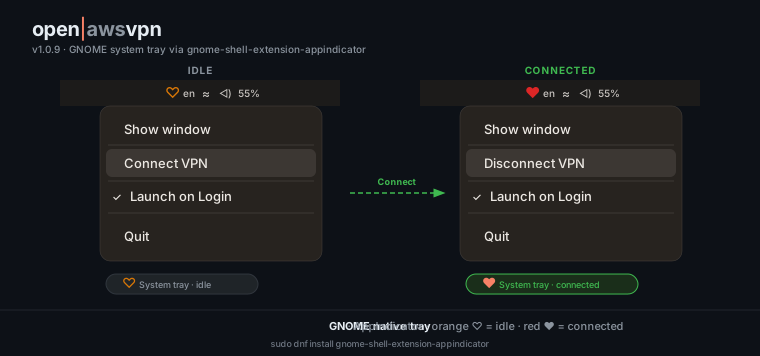
for the system tray icon on GNOME: sudo dnf install gnome-shell-extension-appindicator
 amd64 · arm64 · ppc64le · Fedora 43/44/rawhide
git clone https://github.com/openlawsvpn/go-openlawsvpn
cd go-openlawsvpn
make cli
CGO_ENABLED=0 — fully static, no C toolchain required
SAML / SSO support
openlawsvpn implements the complete CRV1 challenge-response flow. Works with any SAML 2.0 identity provider supported by AWS — Okta, Microsoft Entra ID (Azure AD), Google Workspace, JumpCloud, and others. No custom IdP configuration required beyond what you already have set up for AWS Client VPN.
Interactive (desktop / mobile)
SAML login page opens in your system browser or Chrome Custom Tab. Credentials never touch openlawsvpn code — only your IdP and the AWS endpoint see them.
Headless (CI/CD, servers)
Use the Relay service so a human approves auth from their phone while the headless agent establishes the tunnel. No secrets stored in the pipeline.
GTK4 Desktop GUI
A libadwaita app that lives in your GNOME tray. Import a .ovpn profile,
click Connect — SAML opens in your browser, the tunnel comes up, and the tray icon turns red.
On GNOME, install gnome-shell-extension-appindicator to enable the native system tray icon.